
OEE matters because it gives operations teams a disciplined way to ask a harder question: where is the line really losing productivity? A low OEE number by itself is not very useful. What matters is whether the loss is coming from uptime, speed, or quality, and whether the team can isolate the cause quickly enough to act. In this sterile fill-finish scenario, Fill Line 01 is underperforming, and the workflow moves the engineer from OEE setup, to interpretation, to event-based investigation, and finally to a much narrower root-cause path.
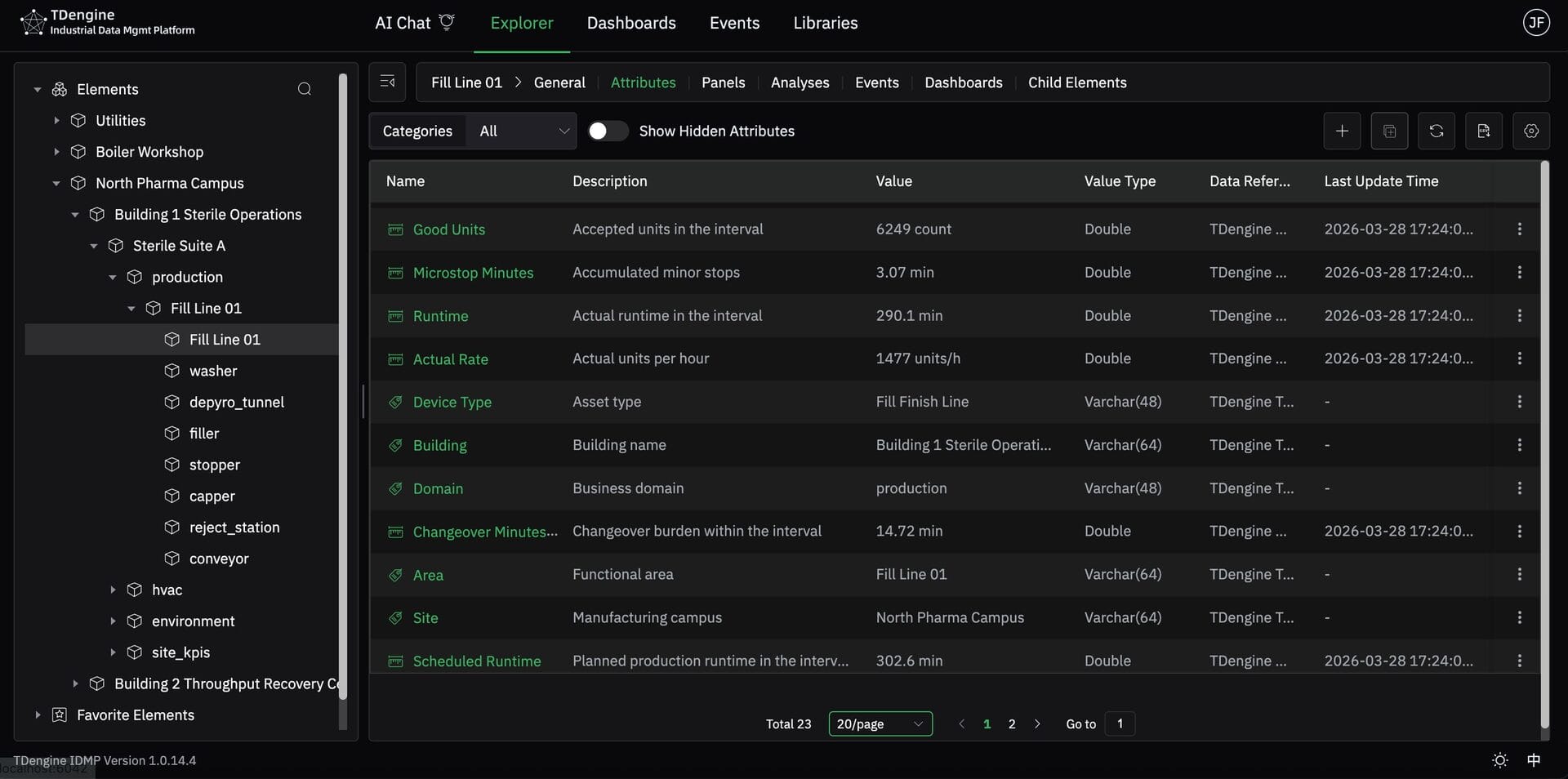
The line sits in a realistic pharma manufacturing context under North Pharma Campus, Building 1 Sterile Operations, Sterile Suite A. Fill Line 01 is modeled as a real production line, with the washer, depyrogenation tunnel, filler, stopper, capper, reject station, and conveyor beneath it. That is how OEE should be handled in practice: calculated at the level where production responsibility actually lives, using the operating signals the line team already cares about.
Start from the line model, not the chart
Before anyone builds a panel, they need to confirm the line already has the right inputs. For Fill Line 01, the key metrics are already in place: Scheduled Runtime, Runtime, Ideal Rate, Actual Rate, Total Units, Good Units, Reject Units, Microstop Minutes, Changeover Minutes, and Starve Block Minutes.
That is an important best practice. OEE is only as credible as the underlying runtime, throughput, and count definitions. If those inputs are ambiguous, the KPI becomes a debate instead of a tool. Here, the engineer starts with a clean line model, so the OEE logic has a solid operational foundation from the start.
Ask AI for the first view in plain language
With the inputs already modeled, the engineer can go straight to the business question. Instead of manually assembling a dashboard, they ask AI to generate the first OEE view:
“Calculate hourly OEE for Fill Line 01, along with relevant metrics in line graph.”
That is a very natural way to begin. It tells the system what to calculate, which line to focus on, the time grain the engineer wants to work with, and that related metrics should appear alongside OEE rather than in isolation. In practice, this is exactly how many engineers think: first show me the OEE trend, then give me the other line metrics that help explain it.
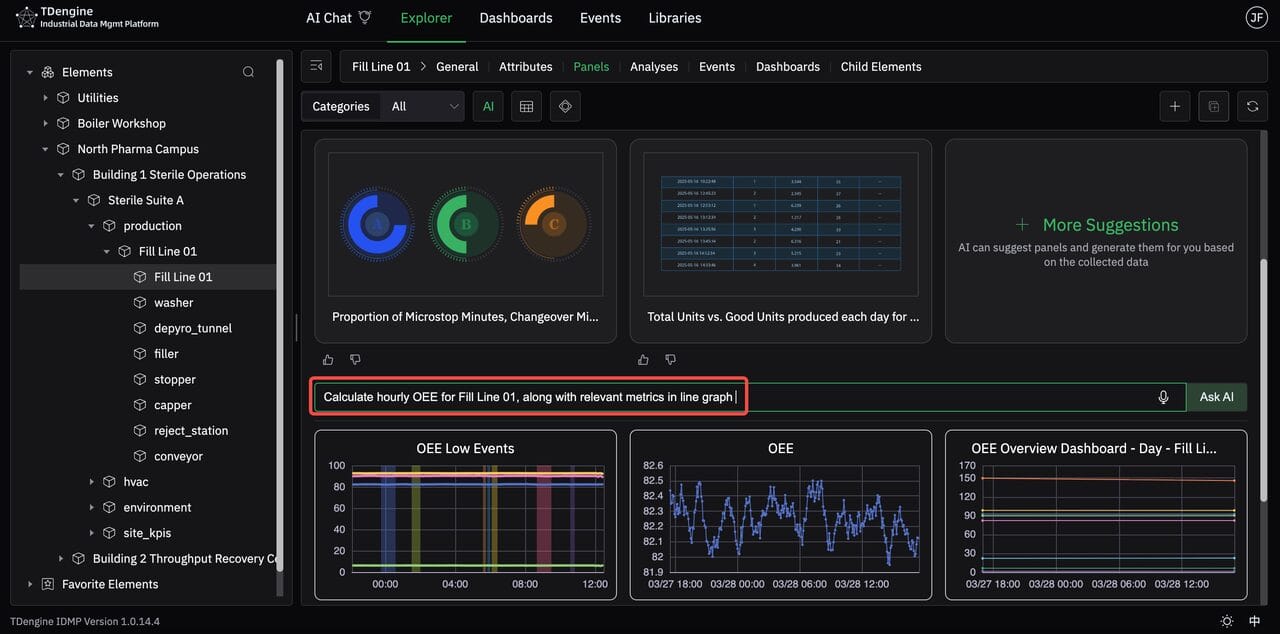
From there, AI generates the initial OEE view automatically. The result is not just a single chart. It gives the engineer a working starting point with OEE and related trends already organized into a usable operational view. That shortens the path from “we think this line is underperforming” to “let’s look at the pattern and start narrowing it down.”
Verify the calculation before trusting it
Once the panel exists, the next step is not interpretation. It is validation.
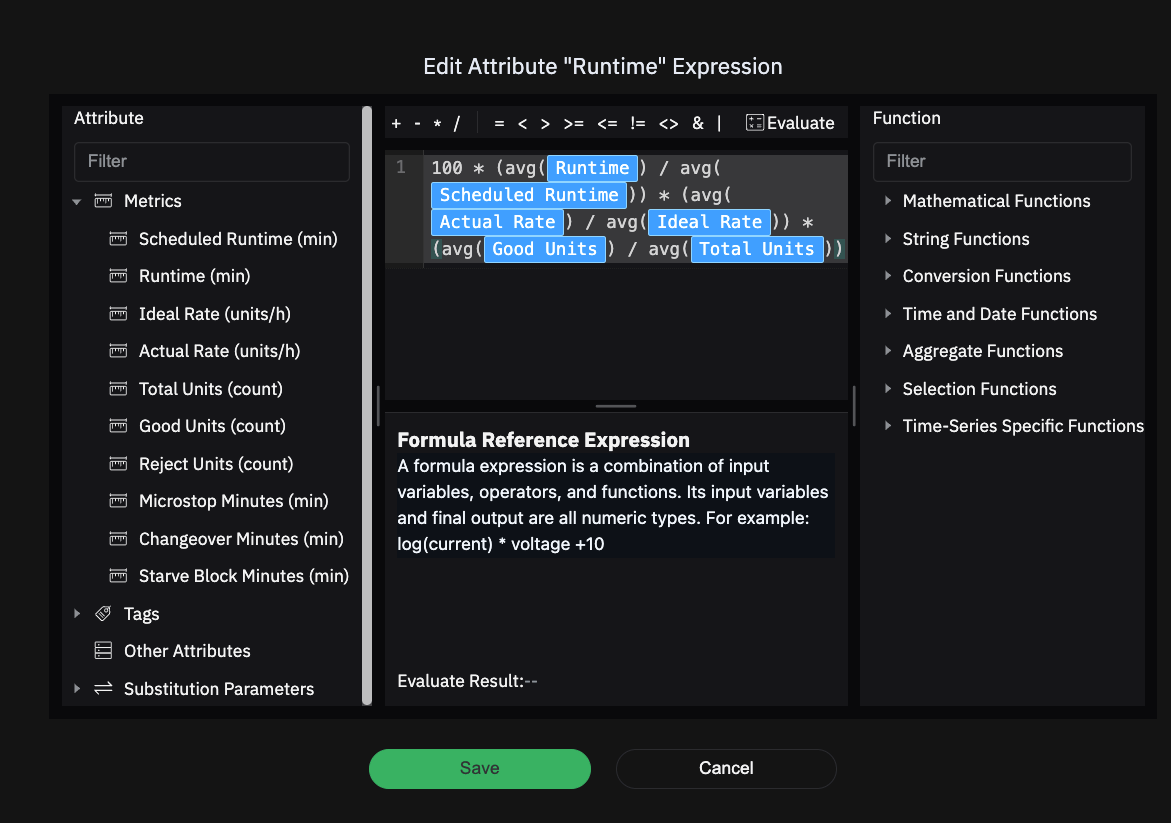
The OEE expression is generated as:
100 × (avg(Runtime) / avg(Scheduled Runtime)) × (avg(Actual Rate) / avg(Ideal Rate)) × (avg(Good Units) / avg(Total Units))This is exactly the kind of transparency an engineer needs. Availability is represented by Runtime over Scheduled Runtime. Performance is Actual Rate over Ideal Rate. Quality is Good Units over Total Units. AI accelerates the setup, but it does not hide the logic.
That is essential in manufacturing. A KPI that cannot be inspected will never become operationally trusted. Here, the engineer can confirm that the formula reflects standard OEE structure before using it to make decisions.
Use AI Operational Insights to form the first hypothesis
Once the formula is confirmed, the engineer reads the line the same way they would in a real investigation.
The trend view is paired with an AI-generated operational summary. The key takeaway is immediate: OEE is staying below 70% over the last 12 hours. Availability is relatively stable at about 91%. Quality remains above 97.5%. Performance is materially weaker, sitting around 77–78%. Downtime per hour is fairly steady, and reject loss is small.
That first-pass diagnosis matters because it prevents the team from chasing the wrong problem. If Availability were collapsing, the investigation would begin with downtime and fault states. If Quality were the main loss, the team would move toward rejects, scrap, or inspection issues. But that is not what this line is showing. The weakness is concentrated in Performance.
This is the first meaningful narrowing of root cause. The question is no longer “why is OEE low?” It becomes “why is the line running below its intended rate?”

Build a rolling OEE KPI from raw data
Once the formula is confirmed, the next step is to make the KPI operational in real time. In this example, the line is sending runtime, scheduled runtime, actual rate, ideal rate, good count, and total count every 5 minutes. Rather than calculating OEE on each individual 5-minute slice, the engineer configures the analysis as a Sliding Window.
The setup is straightforward:
- Trigger Type: Sliding Window
- Sliding: 5 minutes
- Rollup On Window > Interval: 1 hour
What this does is important. The analysis runs every 5 minutes, but each run looks back over the most recent 1 hour of data. The result is not a raw point-in-time OEE value. It is a rolling 1-hour OEE, refreshed every 5 minutes.
That is a much better way to monitor OEE on a live production line. If the KPI were calculated directly from each 5-minute slice, it would be too sensitive to short fluctuations and would become hard to interpret. By using a 1-hour rolling window, the line team gets a view that is still responsive, but much more stable and meaningful for operations. This is a good practice for OEE in real manufacturing environments: keep the refresh interval short enough to catch deterioration early, but calculate over a longer enough window to avoid reacting to noise.

Use the AI readout to choose the investigation path
By this point, AI has already done something useful: it has told the engineer where to look first. The line is not mainly losing OEE through Quality, and it is not showing Availability as the dominant issue either. The strongest signal is Performance.
But an AI summary is still only a readout. To investigate the loss properly, the engineer needs a consistent way to isolate the bad periods and compare other KPIs against those same periods. Otherwise, the analysis becomes subjective.
That is why the next step is to define low-OEE windows explicitly. Once those windows are marked, the engineer can line up Availability, Performance, speed loss, and microstop-related behavior against the exact same time slices and see which signal really tracks the loss. From an engineering perspective, this is the difference between a useful observation and a defensible analysis.
Define low-OEE windows for investigation
Once the team has that initial directional read, the engineer defines what counts as a meaningful low-OEE period.
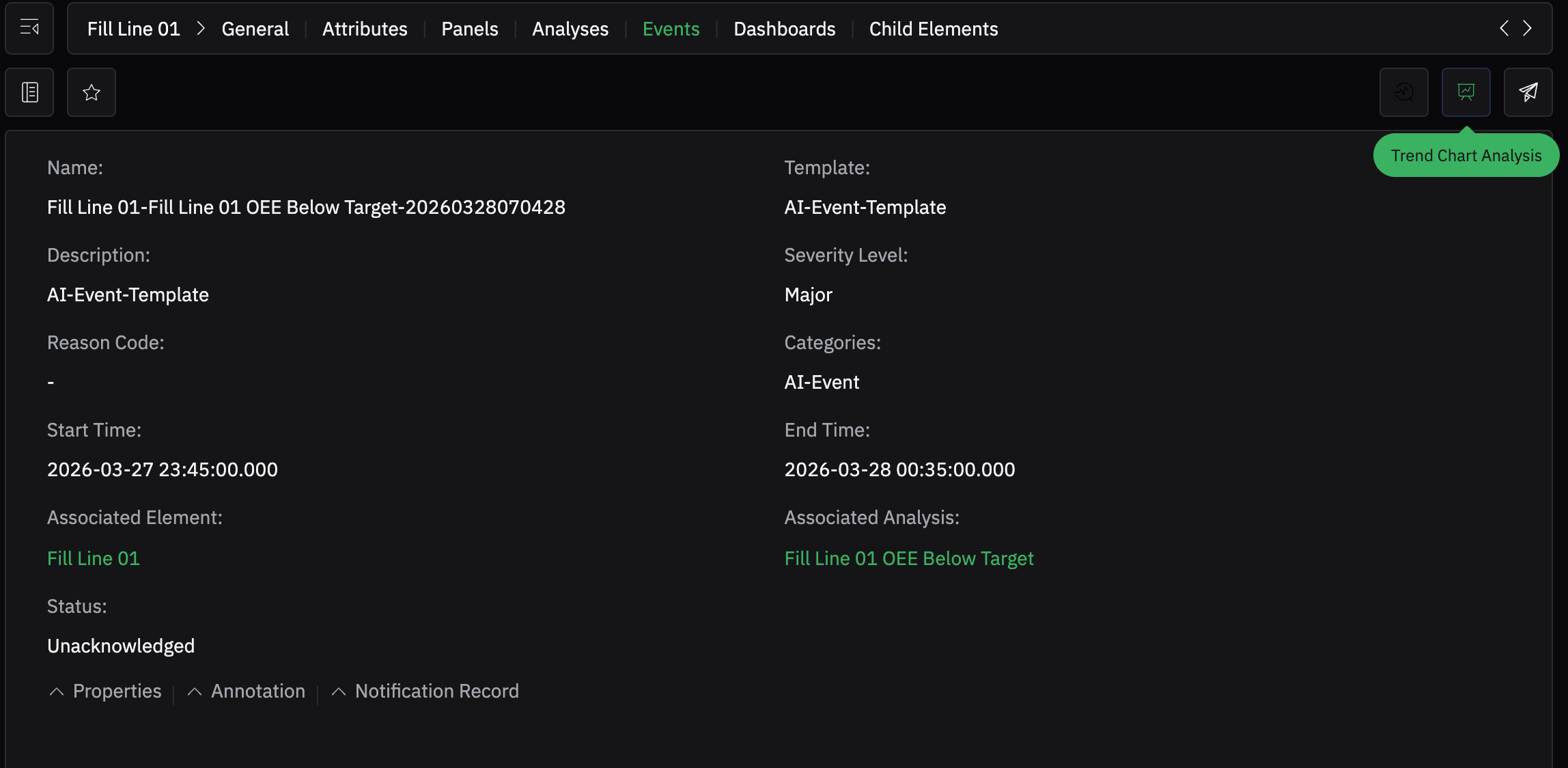
The rule is configured as an Event Window. It starts when attributes['OEE'] < 82.2 for 10 minutes, and ends when attributes['OEE'] >= 82.2.
This is a sensible threshold design. OEE will naturally move around, especially when it is being refreshed every five minutes. If every brief dip created a flagged window, the team would quickly stop trusting it. Requiring the value to stay below 82.2 for ten minutes keeps the analysis focused on sustained underperformance rather than momentary noise. The trigger configuration shown in the interface matches exactly that start and stop logic.

Let the event define the investigation window
Once the rule is active, the system records a real low-OEE event for Fill Line 01. At that point, the engineer is no longer working from a general impression that the line has been performing poorly. They now have a specific event window to investigate.
That changes the quality of the analysis immediately. Root-cause work is much more effective when the problem is bounded in time. Instead of asking what happened “sometime during the shift,” the engineer can focus on the exact windows where the line was bad enough to meet the threshold.
Put the low-OEE windows directly on the timeline
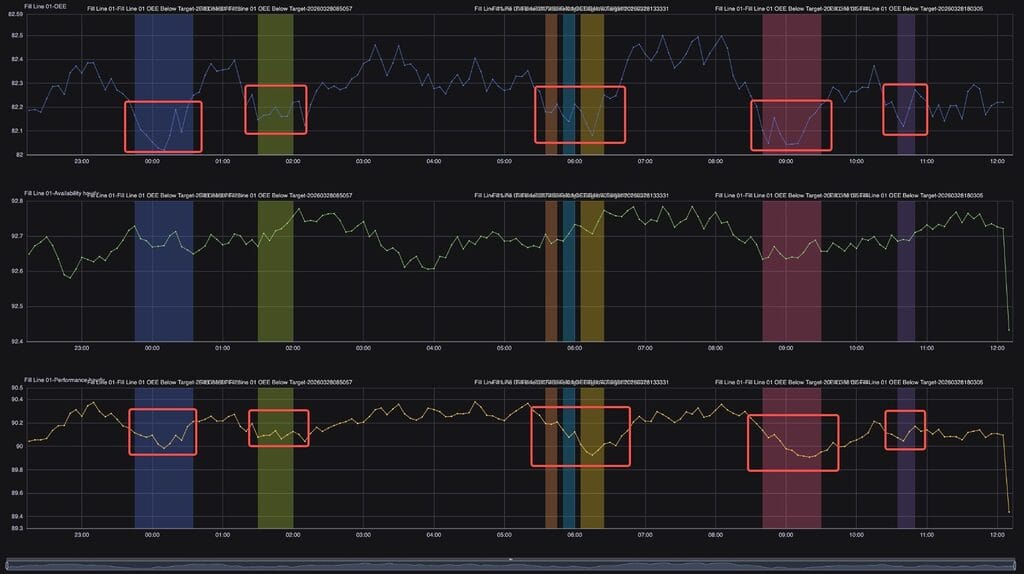
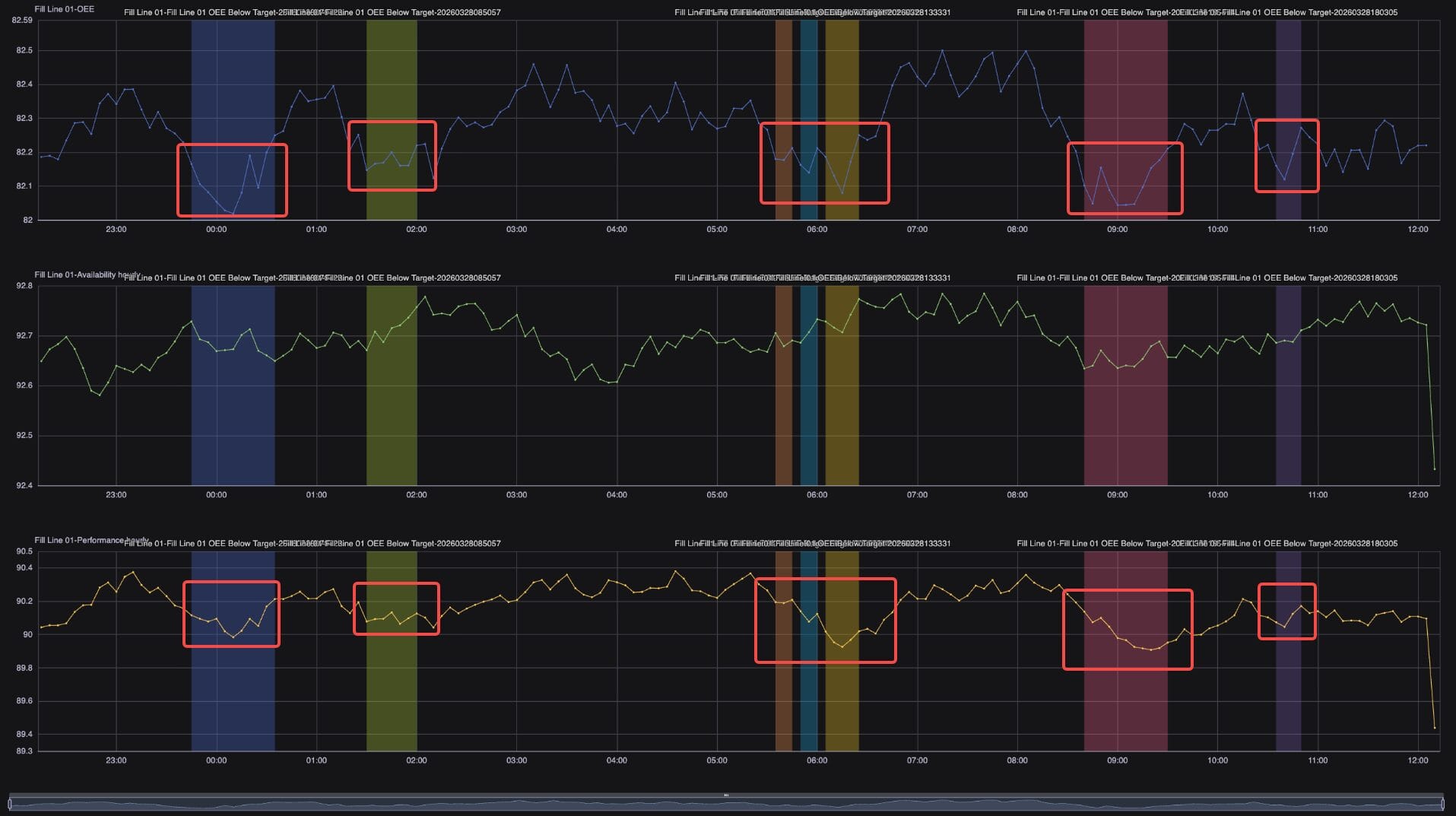
With the event created, the engineer overlays those low-OEE windows on the trend. The colored bands now isolate the exact periods when OEE fell below the operating threshold.
This is where the workflow becomes disciplined. Rather than scrolling through history and trying to eyeball where the problem started, the engineer now has a set of bad windows already marked on the timeline. Some are isolated. Some cluster together. That alone already says something about the pattern of degradation.
Defining the bad windows first is a very effective troubleshooting approach for OEE. It turns a broad performance problem into a set of specific episodes that can be compared against other signals.

Compare the event windows against Availability and Performance
Now the engineer tests the first hypothesis properly.
Availability and Performance are added beneath the OEE trace and aligned to the same low-OEE windows. This is the critical validation step. Availability does move, but it does not track the low-OEE windows nearly as tightly as Performance does. Performance, by contrast, drops in the same windows where OEE falls below threshold.
That confirms the direction of the investigation. Low OEE on this line is tightly connected to Performance loss. It is not primarily being driven by lost runtime. That is a very important distinction, because it keeps the team from defaulting to downtime analysis when the real issue is the line running below its intended rate.
This is also good OEE practice. Before drilling into detailed causes, first determine which of the three components is truly responsible for the loss. Otherwise, teams waste time investigating the wrong branch of the problem.
Drill down one level deeper: speed loss, not microstops
Once Performance is identified as the main driver, the engineer goes one level deeper.
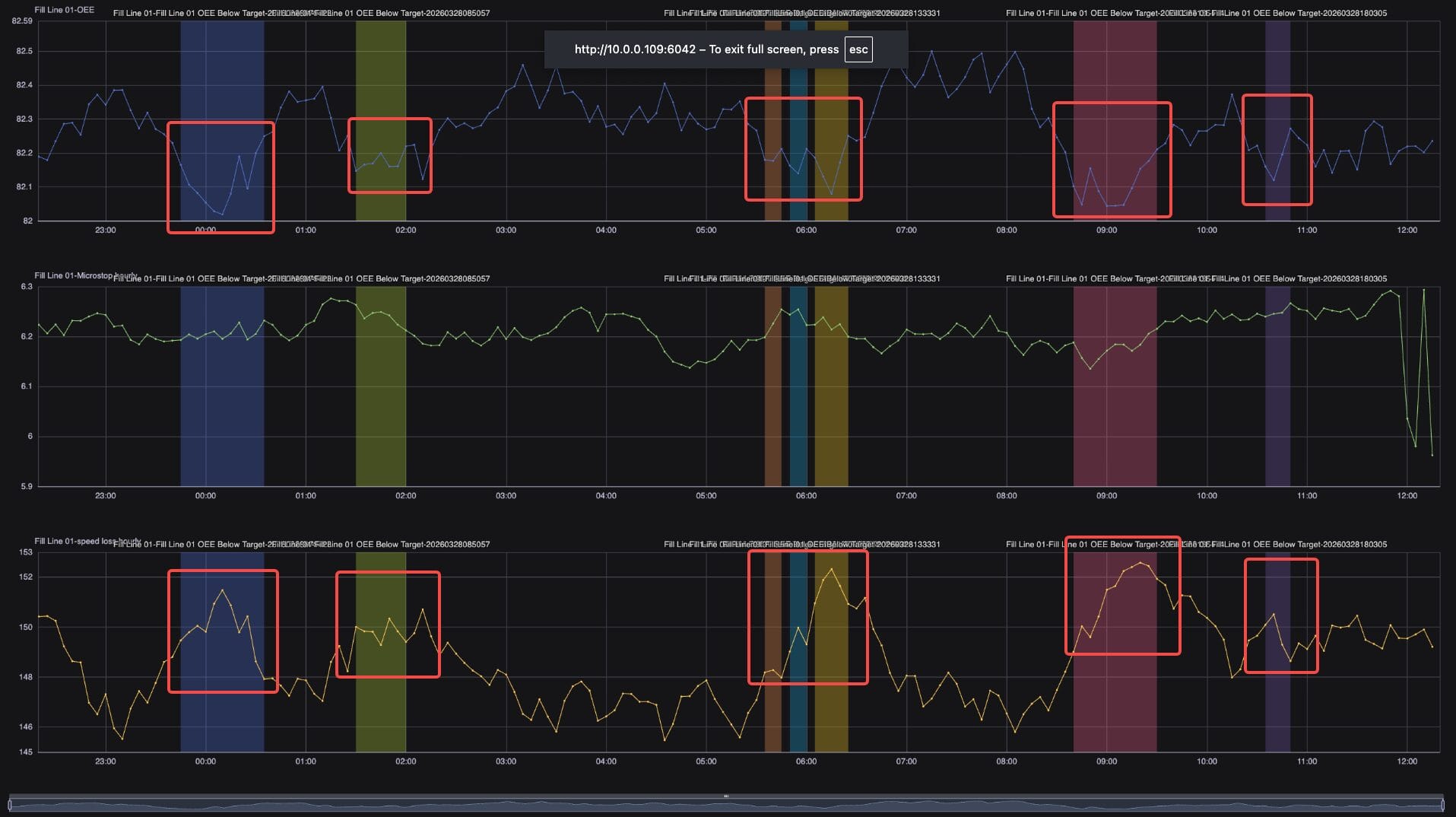
At this stage, the question is no longer whether OEE loss is performance-related. That has already been established. The question now is what kind of performance loss the line is experiencing. The same low-OEE windows are carried forward and compared against the next layer of performance-related signals.
This is where the root-cause path tightens. The low-OEE periods are directly relevant to speed loss, not to microstops. If microstops were the dominant explanation, those windows would line up consistently with stop-related behavior. But the investigation does not point there. The stronger pattern is that the line is running below its intended speed during those windows.
That is a much more actionable conclusion. The team now knows they should focus on the reasons the line is under-speed during those periods, rather than treating microstop count as the primary culprit. In practice, that changes the next troubleshooting conversation completely. The investigation is now centered on sustained rate loss, not short interruption frequency.
This is how OEE should work in real operations: identify the bad windows, isolate the responsible OEE component, and then trace that component to the specific loss mechanism. In this case, the path is clear: low OEE → low Performance → speed loss.
Closing
The value of this workflow is not that it produces an OEE number faster. The real value is that it helps an engineer move through the logic of investigation in the right order.
They start with the line model already in place. They generate the first OEE view in plain language. They verify the formula. They use the first AI summary to narrow the problem from “low OEE” to “low Performance.” They turn that condition into an event. They isolate the bad windows. Then they compare Availability and Performance, confirm the dominant loss is Performance, and drill down further until the problem resolves into speed loss rather than microstops.
That is a realistic and useful way to apply OEE in sterile fill-finish manufacturing. The KPI is not the destination. It is the entry point into root-cause analysis.


